How to set up a QR code for wedding photos
Four ways to put a QR code on your wedding tables, what each one asks of your guests, and how to print a sign people actually scan.
The short answer
Decide where the photos should go first: a Google Photos album, an iCloud shared album, a Dropbox file request or a guest camera app. Turn its link into a QR code, print it on a small sign for every table, and scan it yourself on an iPhone and an Android phone before the day.
A wedding QR code for photos is a link printed on a sign. A guest points their phone camera at it, the link opens, and their photos go wherever that link leads. So start by deciding where the photos should end up and what a guest has to do to get them there, then make the code.
I make Unposed, a guest camera app, so I have a side in this. Below are the four ways couples do it today, with what each one asks of your guests, checked against each company's own help pages in October 2026.
Four ways to collect wedding photos with a QR code
| Option | A guest needs | You get |
|---|---|---|
| Google Photos shared album | Usually a Google sign-in to add photos | One album everyone can watch fill up during the day |
| iCloud shared album | An iPhone, or a browser and maybe an email address | Full-resolution photos from up to 99 guests |
| Dropbox file request | A browser, their name and email | Files in your Dropbox that guests never see |
| A guest camera app, like Unposed | Nothing. The camera opens. | One gallery that opens for everyone at a time you pick |
Google Photos shared album
Google Photos makes a QR code for an album itself, so you don't need a separate generator. Create an album, share it, turn on Collaborate, and anyone with the link can view the photos and add to the album. The Collaborate setting is all or nothing: you can't let one guest add photos and stop another.
What to know before you print it:
- Viewing the album needs no account. Adding photos usually asks for a Google sign-in, and Google's help pages don't promise otherwise, so expect a few guests to stop there.
- An album holds up to 20,000 photos and videos.
- Your free 15 GB is shared with Gmail and Drive.
- Everyone sees every photo as it arrives, including the blurry ones from the dance floor.
Choose Google Photos if most of your guests already use Google and you'd like a live album during the day.
iCloud shared album
iCloud shared albums changed in September 2026. With iOS 27, Apple says guests can join and add photos on the web, "even without an Apple Account or Apple device", so Android guests can take part. They open the link, choose Join, and may be asked for an email address.
The limits on Apple's limits page matter for a wedding:
- An album holds at most 100 people, you included. The average US wedding in 2025 had 117 guests, according to The Knot's 2026 Real Weddings Study.
- Photos are kept at full resolution, and every guest's photos count against your iCloud storage. The free plan has 5 GB.
- A temporary album costs no storage, but it holds 5,000 items and is deleted after 30 days.
- An album made on iOS 26 or earlier still shrinks photos to 2,048 pixels on the long side until you upgrade it.
You need an iPhone, iPad or Mac to make the album, so iCloud works best for a smaller wedding where you have storage to spare.
Dropbox file request
A Dropbox file request is a one-way upload page. Guests don't need a Dropbox account, though they may be asked for their name and email. They can't see each other's files, so nobody browses the photos during the party.
Every upload counts against your Dropbox storage, and the free Basic plan has 2 GB, room for several hundred phone photos. When it fills up, guests get an error. Dropbox makes sense if you want the files and nothing else, and you already pay for more storage.
A guest camera app
A guest camera app turns the QR code into a camera instead of an upload page. This is what I build, so here is how Unposed works, and you can weigh it against the rest.
You make the event in the Unposed iPhone app and print the sign it makes. A guest scans it and a camera opens: an App Clip on an iPhone, the browser on Android. There is nothing to install and no account. Each guest gets a roll of 36 shots. Every shot is saved on the phone first and uploads when there's signal, so a barn with no reception still works. Until the reveal, each guest sees only their own shots. At the time you pick, the end of the night or the next morning, the whole gallery opens for everyone, at full resolution and without a watermark.
Unposed is free for up to 10 guests, then one payment per event: $4.99 for up to 25 guests, $19.99 for up to 75 and $49.99 for any number. A guest counts only when they take their first photo. Hosting needs an iPhone. See how Unposed works.
How to make the QR code
If the service makes a code for you, use that one. Google Photos makes one for each album, and Unposed puts the code on the sign it prints. Otherwise, copy the album's share link and paste it into a free QR code generator.
Make a static code. A static QR code holds the link itself and works for as long as the link does. A dynamic code points at the generator's own server first, and some generators switch dynamic codes off when a trial ends. On QR Code Generator, dynamic codes made during the 14-day trial stop working afterwards, while static codes keep working.
Then scan the code with two phones, an iPhone and an Android phone. iPhones scan with the Camera app or Code Scanner. Pixel phones use the Camera app or Google Lens. Samsung phones scan in the Camera app's Photo mode, though the setting may need turning on. Expect a mix at your tables: in September 2026, 46% of US mobile web traffic came from Android phones.
Print a sign people scan
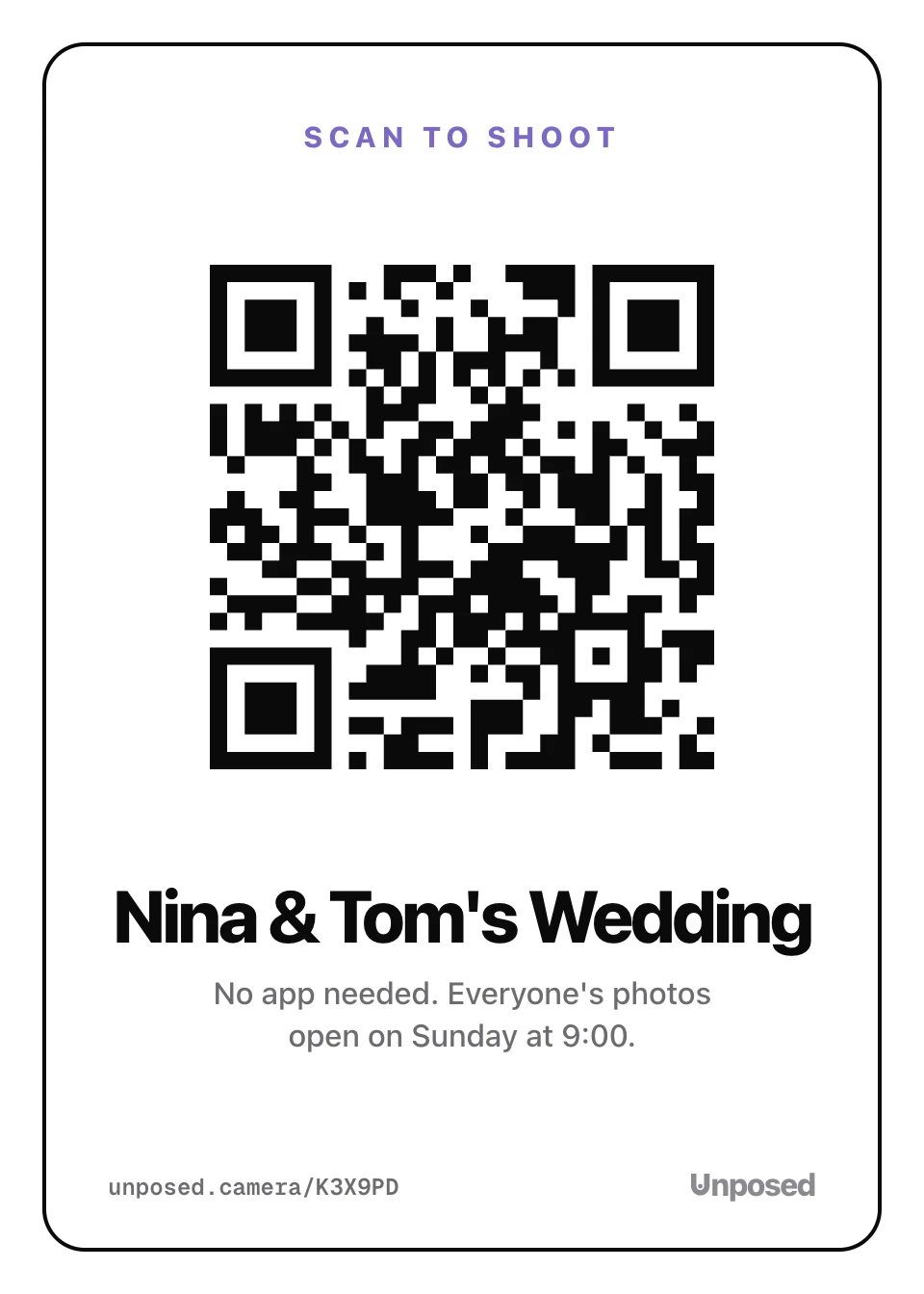
Tell guests what the code does. Put three things on the sign: one line that says what to do, the code itself, and a short address to type for the phone that won't scan.
Then get the size and spacing right, because they decide whether it scans:
- Make the code about a tenth as wide as the distance it's read from. That's Bitly's 10 to 1 rule, which works out to about 2.5 to 3.5 inches on a table card read from 2 or 3 feet, and about 7 inches on a sign by the entrance read from 6 feet.
- Leave a blank margin around the code. DENSO WAVE, the company that invented the QR code, asks for a margin four modules wide (four of the code's small squares) on every side. Flowers or a frame drawn up to the code's edge can stop it scanning.
- Print it dark on light, on matte paper. Gloss under string lights throws glare into the camera.
On the day
- Put one sign on every table, upright at eye level when people sit, not flat under the centerpiece. Add one at the bar and one by the entrance.
- Ask your DJ or MC to mention it once, right after dinner, when phones come out anyway.
- Scan the code yourself at the venue before guests arrive, on its Wi-Fi and off it. An upload page needs signal at the moment a guest presses upload, so find out early if the venue has none.
- Decide who sees what, and tell guests. A Google Photos album shows every photo live, a Dropbox file request shows guests nothing, and Unposed shows each guest their own shots until the reveal.
- Download everything in the first week. A temporary iCloud album is deleted after 30 days, and storage you pay for monthly is easy to forget.
If you also want the photos guests post publicly, make a hashtag with the wedding hashtag generator and put it on the same sign.
Questions
Do guests need an app or an account?
It depends on where the code leads. A Google Photos album usually asks for a Google sign-in before a guest can add photos. An iCloud album on iOS 27 may ask a guest without an Apple device for an email address. A Dropbox file request asks for a name and email. Unposed asks for nothing, and the camera opens.
Does a wedding QR code for photos work on Android?
Yes. Android phones scan QR codes with the Camera app. What changes is the page the code opens. An iCloud album made on iOS 26 or earlier only lets Android guests look at the photos. iOS 27 albums, Google Photos, Dropbox and Unposed all let Android guests add their own.
How long do QR codes last?
A static QR code lasts as long as the link inside it. A dynamic code from a free trial can stop working when the trial ends, so check which kind you made before you print a card for every table.
Can guests upload full-quality photos?
An iCloud album on iOS 27 keeps originals at full resolution, and a Dropbox file request stores each file as it was uploaded. Google doesn't say what quality photos added to a shared album keep. Unposed keeps every original at full resolution.
Can I make the code for free?
Yes. Google Photos makes one for each album, and a static code from any free generator works for good. Unposed is free for up to 10 guests and prints the code on its sign.